
A course your crew can use.
CREATE WITH STRAWBOSS
Turn your procedures into practical lessons.
Lessons, visuals and knowledge checks.
Explore Course CreatorExample output. Review before publishing.Spend less time on admin. Create forms, find answers and build company learning.
Your crew. Your company knowledge. One AI-powered workspace.
David’s Strawboss product film shows how site reports, inspections, actions, training and company knowledge connect the office with crews on site. Select play to watch.
Good reporting is only the beginning. Give every finding a place to go, and your crew a clear next step.

Start with a template, build your own or get a first draft from AI. Capture the details with answers and photos.
Assign an action from the finding. Keep the evidence with the work and see what still needs attention.
Bring field reports and follow-up into one workspace, so the next person has the context they need.
Your worksite knowledge. Your team’s experience.
AI tools to help put them to work.

Bring site inspections, toolbox talks and crew training together, with AI help for the preparation behind them.
 Find the company answerAsk about the documents and records behind the job.Sofia

Connect equipment checks, company procedures and workforce training without leaving the information scattered.
Get to the right informationFind company documents and inspection records.Sofia
Support changing locations with company knowledge, field records and AI-assisted preparation in one workspace.
Bring company knowledge into reachAsk for help finding the source behind an answer.Sofia
Bring workplace procedures, staff learning and safety records together so the people managing them have a clearer starting point.
Find the relevant company documentGet help locating workplace knowledge and records.Sofia
Keep store procedures, staff training and worksite records together, with AI help for the work that starts at your desk.
Find an answer across your knowledgeLocate the documents behind your store processes.Sofia
Support drivers and yard teams with company safety knowledge, training records and clearer preparation for the work ahead.
Find the record behind the workGet help locating company documents and inspection history.SofiaOne connected platform for the details that keep work moving.
Capture the work. Keep the evidence.
Explore Actions & Follow-UpFrom a finding to a finished task.
Explore Company learningKnowledge your people can use.
Explore Files & DocumentsThe right reference, within reach.
Explore Worksites & EquipmentKeep the place with the work.
Explore Crew & AccessConnect people with their work.
Explore Risk RegistersKeep risks and controls in view.
Explore Reports & EvidenceA record you can follow.
Explore5 days of Premium. No card needed.
The answer might be in a procedure, a document or a record. Ask Sofia about your company information, then follow the sources behind the answer.
Get help finding the information behind the job, without remembering which document to open.
Review the supporting company sources. Your team stays in control of what happens next.

Turn company knowledge into lessons, videos, posters, documents, briefs and answers.
A course your crew can use.
Lessons, visuals and knowledge checks.
Explore Course CreatorExample output. Review before publishing.Your knowledge, brought to life.
Narration, visual styles and HD export.
Explore Video ProducerExample output. Review before publishing.A message worth stopping for.
Your site photo. Your message. Ready to print.
Explore Safety PosterExample output. Review before publishing.From company records to a clear draft.
Editable SOP, SWP and JHA drafts.
Explore Safety DocExample output. Review before publishing.The right conversation before the job.
Inspections, incidents and actions in one brief.
Explore Worksite BriefExample output. Review before publishing.Answers with something behind them.
Plain-language answers and source references.
Explore ResearcherExample output. Review before publishing.
Strawboss mobile app
Help your crew capture the safety work while they are doing the job.

Give the things your experienced people know a place to live. Create training with Studio, share it with your crew and keep completion records together.
Use company material to create a course draft in Studio. Review it and make it yours before sharing.
Bring courses, training records and qualifications into the same workspace your crew already uses.


Forms, actions, training and company knowledge. Give your team a powerful workspace that earns its place in the working day.
Strawboss connects forms and inspections, actions, training, files and company knowledge in one workspace for the office and the worksite.
Yes. Start with an existing form, an idea or a Library template. In Studio, company procedures can become a course draft or other useful material for your crew. You can edit the result before publishing.
You choose the sources available to Strawboss AI. Sofia can use those company records to help answer questions and link you to supporting information.
You get 5 days free with 5 seats. No payment card is required and there is no automatic charge. See Pricing for the included AI allowance and paid plans.
Yes. Use the mobile app for assigned forms, actions and training, with the office connected through the desktop workspace. Download Strawboss using the App Store or Google Play links above.
Today counts
Done for today. Now you know.
Sofia···Ask a question, share a photo,
or just speak.
The loading bay inspection recorded a blocked walkway.
Site inspection · North site Full WeekStreak
 Ten ClosedActions
 Foreman14-day streak
 Safety Lead30-day streakChat with Sofia


Ask about a site, report, hazard, or your crew…
✓ Site inspection assigned
Loading bay essentials reviewed
Company procedure added
North site · Crew connected
Open the inspection, see the evidence, and give the next step an owner.
✓ Inspection assigned.
Describe it. Build with AI.
Start from scratch.
Add a file or photos.
Use a ready-made form.
✓ Questions reviewed by your team
Publish & assignStrawboss AIThe site inspection recorded loose materials blocking the walkway. Review the finding and assign the follow-up.
Turn company files into an editable course.
Create a narrated safety video.
Make a print-ready poster for your crew.
Draft an SOP, SWP, JHA or work instruction.
Bring inspections, actions and incidents together.
Find sourced safety answers and references.
Turn your company knowledge into a course your crew can use.
Describe it and Strawboss builds a draft.
Upload PDF, Word, SCORM, text, or images.
✓Before work begins, check that walkways and loading areas are free of loose materials.
What should you do if a walkway is blocked?
✓ Report it and arrange a follow-up.○ Leave the material in place.Walk the loading bay. Record the conditions. Keep photos with the finding.
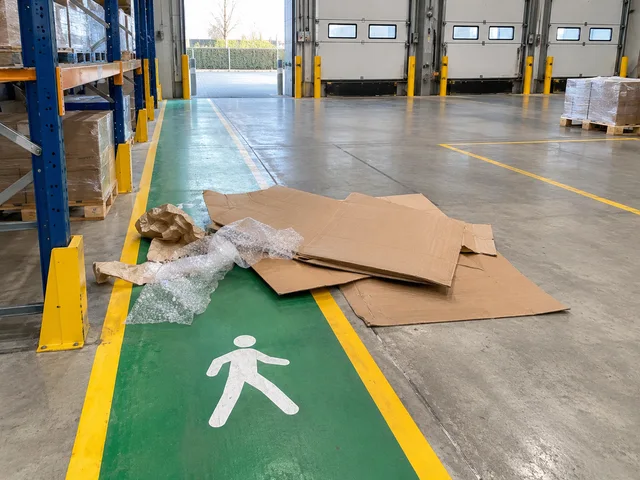
Loose packaging is blocking the walkway.
Jamie cleared the walkway and attached the completion photo.
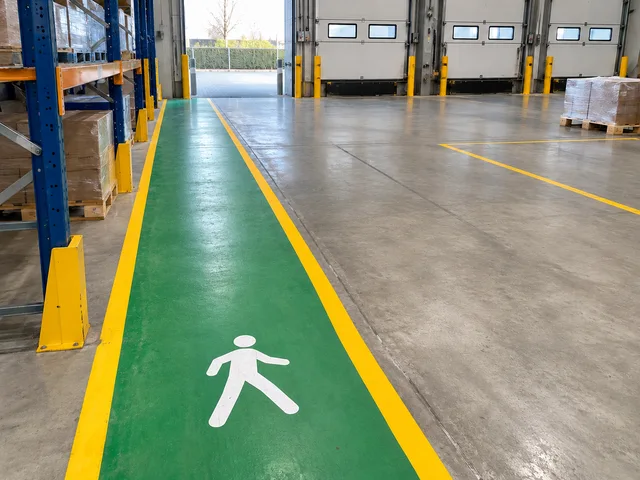
North site · Due today
MLMorgan LeeAssigned by your adminRemove the loose packaging. Attach a photo of the cleared walkway.
Sofia ···Ask a question, share a photo,
or just speak.
Sofia ···Ask a question, share a photo,
or just speak.
